

 Blog
BlogWhat website cookies are, and what "Accept all" really means
Cookies keep you signed in and remember your language, but some follow you from site to site. What the banner buttons do, and how to choose well.
Priya opens a recipe site to check how much rava goes into upma. Before she sees a single ingredient, a box covers half the screen: "We value your privacy. Accept all." She taps it, because that is the biggest button and she is hungry.
Most of us do the same thing many times a week. The box is a cookie banner, and the button decides which small files that website, and often dozens of other companies, may keep in your browser. This guide explains what cookies are, which ones are useful, which ones follow you around, and what each button on the banner actually does.
The short version: cookies are not viruses and they cannot read your photos. They are labels. The real question is who gets to write the label and who gets to read it later.
What a cookie actually is
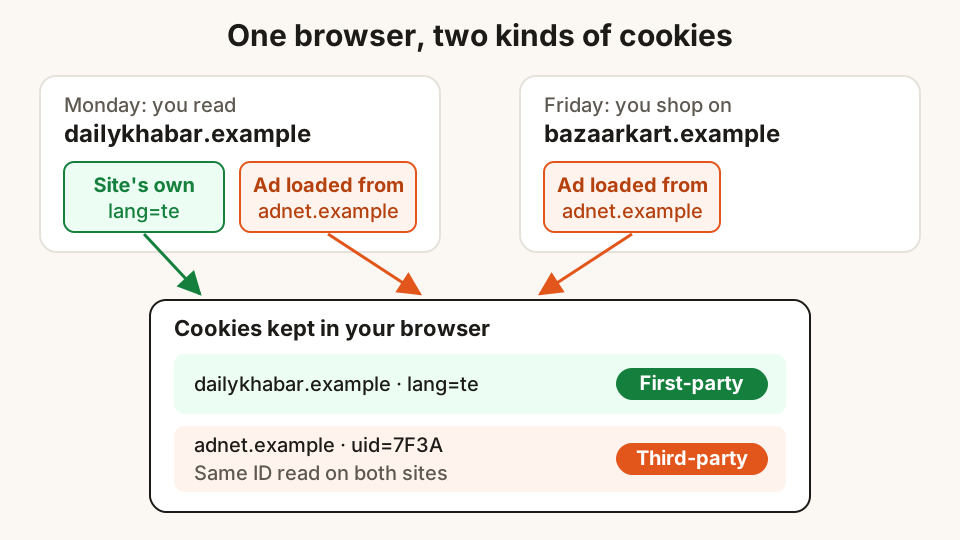
A cookie is a small piece of text that a website asks your browser to store. The next time your browser talks to that website, it sends the text back. A cookie can be as simple as lang=te, which tells a news site to show you Telugu headlines without asking again.
Each cookie is small, usually no more than about 4 KB, which is roughly a page of plain text. It does not run like a program. What makes it powerful is not its size but the fact that it comes back, again and again, every time you return.
Cookies do three broad jobs:
- Keeping you signed in. Without a cookie, your email would ask for your password on every click, and your shopping cart would empty each time you opened a new page.
- Remembering your choices. Language, dark theme, the city you picked for weather, the size of text you prefer.
- Tracking. Recording what you read, click and buy, so that the information can be measured, sold or used to pick ads for you.
The first two are why the web feels convenient. The third is why banners exist.
Session cookies and persistent cookies
A session cookie has no expiry date. It is meant to disappear when you close your browser. A login that ends when you shut the window, or a cart that forgets everything overnight, is usually using session cookies. Some browsers restore your last session when they reopen, so even these can last longer than you expect.
A persistent cookie carries an expiry date. It might last a day, a month or more. The cookie standard now being revised recommends a ceiling of 400 days, but a site can simply set the cookie again each time you visit, so a site you open every week can keep the same cookie for years.
That is why "remember me on this computer" works, and also why an advertising cookie set during one Diwali sale can still be there for the next one.
First-party and third-party cookies
This is the part that matters most for privacy.
A first-party cookie is set by the site whose address is in your address bar. When dailykhabar.example remembers that you prefer Telugu, that is a first-party cookie. It belongs to the site you chose to visit.
A third-party cookie is set by a different company whose content is loaded inside that page: an ad, a "like" button, a chat widget, a video player or an analytics script. You never typed that company's address, but your browser still talks to it, and it can leave its own cookie.
Here is the problem. If the same ad network is loaded on a news site, a cricket site and a shopping site, it sees the same cookie on all three. The cookie holds an ID such as uid=7F3A. Over a week, that ID collects a story: reads Hyderabad news, follows the IPL, looked at running shoes twice. No name is needed for that story to be useful to an advertiser.
Some browsers now block third-party cookies by default; others still allow them unless you change a setting. Trackers also have other methods, which we cover in how ad trackers follow you around the web. Cookies are just the oldest and most common.
What the banner buttons really do
Cookie banners became common because European rules require websites to ask before storing non-essential information on your device. Many Indian and international sites show the same banner to everyone. The buttons usually mean this:
| Button | What it usually allows |
|---|---|
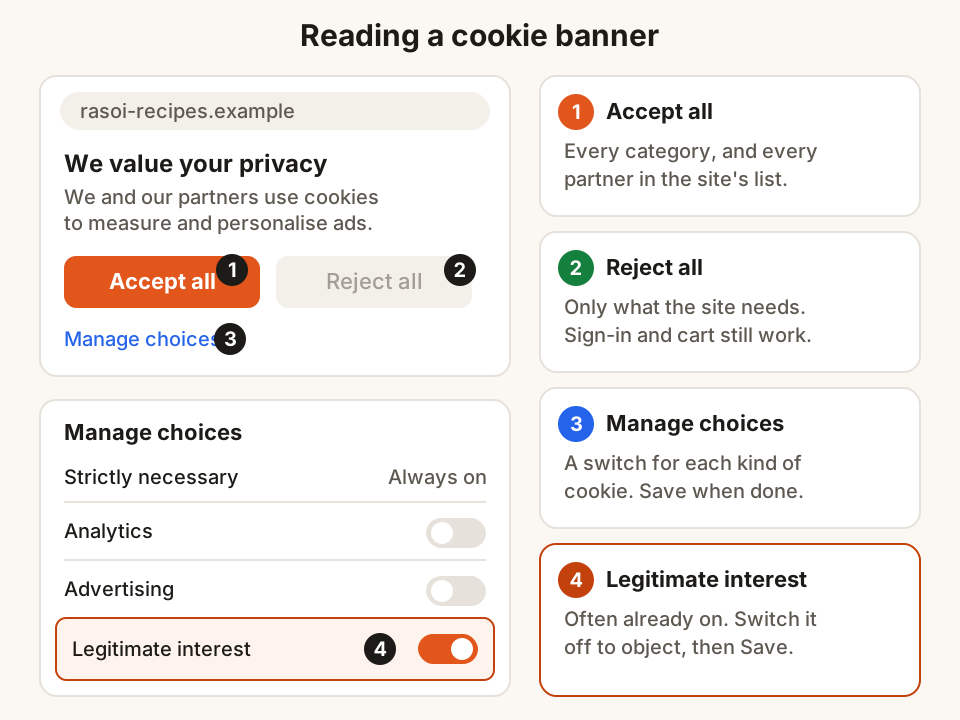
| Accept all | Every category: needed cookies, analytics, advertising, and every "partner" in the site's list |
| Reject all | Only the cookies the site needs to work, such as sign-in, security and your cookie choice itself |
| Manage choices (or Customise, Settings) | A second screen with a switch for each category, sometimes for each partner |
| Closing the banner with × | Depends on the site. A well-built banner treats it as no consent; others are unclear |
"Strictly necessary" cookies cannot be switched off, and that is fine. They keep the site secure, keep you signed in and remember that you said no. If you pick Reject all, you can still log in, add to cart and pay on any properly built site.
The partner list behind Accept all is often much longer than people expect. Open "Manage choices" once on a big news site and scroll: you may find a long list of advertising and measurement companies, each of which is allowed to set or read cookies through that page.
The "legitimate interest" tab
Many banners have a second list, often on another tab, called legitimate interest. These are uses that the site or its partners say they can carry out without asking for your consent, and their switches are often already on. You have the right to object to them, which is what switching them off does. If you have chosen "Manage choices", it is worth checking this tab before you press Save.
Why "Reject" is sometimes hard to find
In 2023, a taskforce of European data protection authorities published a report on cookie banners. It listed the tricks they had seen, and you will recognise many of them:
- No reject button on the first screen, only "Accept" and "Settings".
- Boxes that are already ticked when you open the settings.
- A bright "Accept" button next to a pale grey "Reject" that is hard to read.
- Advertising cookies labelled as "essential".
- No easy way to change your mind later.
The authorities agreed that pre-ticked boxes do not give valid consent, and that withdrawing consent should be as easy as giving it. Whatever the rules where a site is based, these are good tests for whether a site respects your choice.
What India's law says about consent
India's Digital Personal Data Protection Act, 2023 sets out what consent to use your personal data must look like. Section 6 says it must be free, specific, informed, unconditional and unambiguous, given with a clear action, and limited to the data needed for the stated purpose. It also says you can withdraw consent at any time, as easily as you gave it.
The government notified the rules under this Act in November 2025, with an eighteen-month period for businesses to comply. The rules ask for a separate consent notice that is clear and explains the specific purpose. Not every cookie involves personal data, and how the Act applies to each kind of cookie is for lawyers and the Data Protection Board to settle. For you, the useful idea is simple: a fair request to track you is one you can say no to, as easily as yes.
A simple routine for cookie banners
You don't need to study every banner. A few habits cover most cases:
- On a site you visit once, press Reject all. You lose nothing.
- On a site you use daily, open Manage choices once, switch off advertising and the legitimate interest list, and save. The site will remember.
- If there is no reject button, look for "Manage", "Settings" or "Options", and use the "Reject all" or "Save" button inside it.
- To change your mind later, look for a "Cookie settings" or "Privacy choices" link in the site's footer.
- Once a month or so, clear cookies for sites you no longer use. In most browsers this is in Settings, under Privacy, with an option to see all site data and remove one site at a time.
If a site stops working
Blocking or rejecting cookies rarely breaks a site, but it can happen. Some sign-in and payment pages pass you between two websites, for example from a shop to your bank's verification page, and may need a cookie from the other site. If a page keeps reloading or says you are not signed in, allow cookies for that one site in your browser settings rather than allowing them everywhere.
How Hunt Browser helps
Hunt Browser blocks other sites' ads and trackers before they load, on every site. A tracker that never loads cannot set or read its cookie on that page, so many third-party cookies are simply never created. The new tab shows how much data and time the blocking saved you. If a site asks you to allow ads, you can pause blocking for that one site from the Hunt button in the toolbar. Blocking doesn't replace your choice on the banner, so the routine above still applies.
Questions
Are cookies dangerous, or a kind of virus?
No. A cookie is a short piece of text that a site stores in your browser and reads back later. It cannot run programs or open your files. The privacy concern is what the text is used for: a cookie with a tracking ID lets a company recognise your browser across many sites.
If I press Reject all, can I still sign in and shop?
Yes. Cookies needed for sign-in, security, your cart and payment are "strictly necessary" and stay on. Reject all switches off analytics, advertising and partner cookies. If a properly built site stops working after you reject, that is the site's problem, not yours.
Should I delete all my cookies?
You can, but you will be signed out of every site and asked about cookies again everywhere. A better habit is to delete cookies for sites you no longer use, and to sign out and clear cookies on any computer that isn't yours.
Does a private window stop cookies?
It doesn't stop them while you browse. Sites can still set cookies, including tracking ones, in a private window. The difference is that they are deleted when you close all private windows, so they don't follow you to your next session.
Is accepting cookies the same as giving a site my phone number?
No. A cookie doesn't give a site your phone number, email or name. But if you also sign in or fill in a form, the site can link what its cookies saw to the details you gave it. That is why it pays to be choosy about Accept all on sites where you have an account.
Sources
- Using HTTP cookies (MDN Web Docs)
- Cookie expiration limited to 400 days (developer blog)
- Report of the work undertaken by the Cookie Banner Taskforce (European Data Protection Board, January 2023)
- Transparency & Consent Framework policies (IAB Europe)
- The Digital Personal Data Protection Act, 2023 (text hosted by TRAI)
- Digital Personal Data Protection Rules, 2025: explainer (PIB)
Hunt Browser blocks ads and trackers before they load, and has Hunt AI built in. Free for Windows and Mac.
Keep reading
Using public Wi-Fi at stations, cafés and airports safely
What free Wi-Fi can and can't see, how to spot a fake hotspot or login page, which settings to change, and what to keep on mobile data instead.
28 October 2026 · 8 min read
Passwords, password managers and passkeys, explained simply
Why reused passwords get people hacked, how long a good password should be, how a password manager helps, and what passkeys are and how to start using them.
27 October 2026 · 8 min read
Common UPI scams and the simple habits that stop them
The QR code, payment request, sent-by-mistake and fake helpline tricks used on UPI, the one rule that defeats most of them, and what to do if money goes.
25 October 2026 · 9 min read