

 Blog
Using AI to summarise long articles without missing the point
AI summaries save time but drop conditions, numbers and who said what. How to ask for a better summary, and a three-step check before you rely on it.
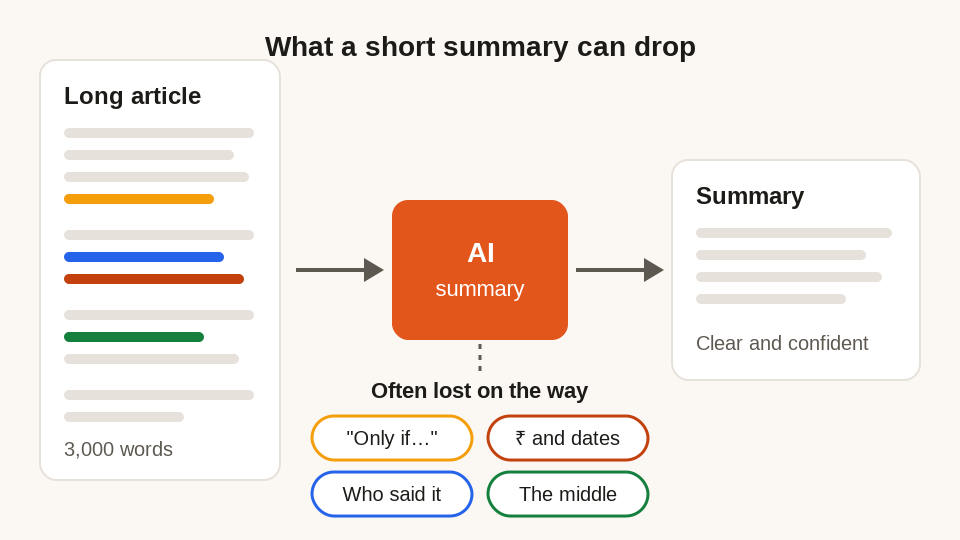
Priya, a second-year B.Com student in Vijayawada, had a 40-page chapter on partnership accounts and one evening before the test. She pasted it into an AI tool, asked for a summary, and got a neat page of ten points. It was clear and confident. It also left out the one exception her lecturer had underlined twice.
That is the trouble with AI summaries. They are often good, and they are always fluent, so you can't tell from the summary alone what was left behind. The summary that saves you an hour can also cost you the one line that mattered.
This guide shows what AI summaries tend to drop, how to ask for a summary that keeps the point, and a quick three-step check before you trust one with anything important: a test, a work decision, or money.
What AI summaries are good at, and where they slip
AI tools are genuinely useful for summaries. They read fast, they spot the main topic, and they can turn a dense page into plain words or into your own language. For deciding whether an article is worth your time, they are hard to beat.
The problems show up in the details. In October 2025 the European Broadcasting Union and the BBC published a study in which journalists from 22 public broadcasters in 18 countries checked more than 3,000 answers from four popular AI assistants about the news. 45% of the answers had at least one significant problem. The most common was sourcing (31%): saying a claim came from somewhere it didn't, or not saying at all. One in five answers had a major accuracy problem, such as an invented or out-of-date detail.
Another 2025 study, in the journal Royal Society Open Science, compared nearly 4,900 AI summaries of scientific papers with the papers themselves. Most models made the findings sound broader and more certain than the authors did, turning "this helped some patients in this trial" into "this helps patients". In a side-by-side test against summaries written by experts, the AI summaries were nearly five times more likely to overgeneralise.
From those studies and plain experience, these are the things most often lost:
- Conditions and exceptions. "Only if", "except for", "unless" and "for now" are the first words to go. They are also the words that change what you should do.
- Numbers. Amounts, dates and percentages get rounded, swapped or attached to the wrong thing.
- Who said what. A summary may present one side's claim as a fact, or mix up two people quoted in the same article.
- The middle. Research on long inputs, such as the 2023 "Lost in the Middle" paper from Stanford and others, found that language models use information at the start and end of a long text more reliably than information buried in the middle.
Decide what the summary is for
Before you ask for a summary, decide what you will do with it. The same article needs a different summary depending on your purpose.
- To decide whether to read it. Three lines on what the article is about and who it is for are enough.
- To revise or remember it. You want the main ideas in order, with the key terms and examples.
- To act on it. You want every rule, deadline, amount and exception, even if that makes the summary longer.
A short, general summary is fine for the first purpose. It is risky for the third. If you are reading a hostel fee circular, a job offer letter or a rent agreement, you are in the third group, and a summary should only ever point you to the clauses to read in full.
How to ask for a summary that keeps the point
AI tools do much better when you tell them who the summary is for and what must not be dropped. A one-line request like "summarise this" leaves every choice to the tool.
The 2025 science-summary study found something surprising: simply telling the AI to "be accurate" made overgeneralising more likely, not less. Specific instructions work better than general ones.
| Instead of this | Try this |
|---|---|
| Summarise this. | Summarise this for a first-year student in 8 bullet points, in the same order as the article. |
| Give me the key points. | List every date, amount and deadline in this notice, each with the sentence it comes from. |
| Make it short. | In 5 lines, then list any "only if", "except" or "unless" conditions separately. |
| Explain this article. | Who is making each main claim here? Separate the facts the article reports from the opinions it quotes. |
| Summarise in Telugu. | Summarise in simple Telugu, but keep technical terms in English in brackets. |
Some more requests that help:
- "Quote the line." Ask for each key point to come with a short quote from the text. It is far easier to check a point when you can search for its quote.
- "What does it not say?" Ask what questions the article leaves unanswered. This often surfaces the missing conditions.
- "Split it by section." For long documents, ask for one or two lines per section or heading. This makes it harder for the middle to vanish.
- "Keep the hedges." Ask the tool to keep words like "may", "in this study" and "so far" when they appear in the original.
The three-step check before you rely on it
You don't need to reread the whole article to check a summary. Three quick steps catch most problems.
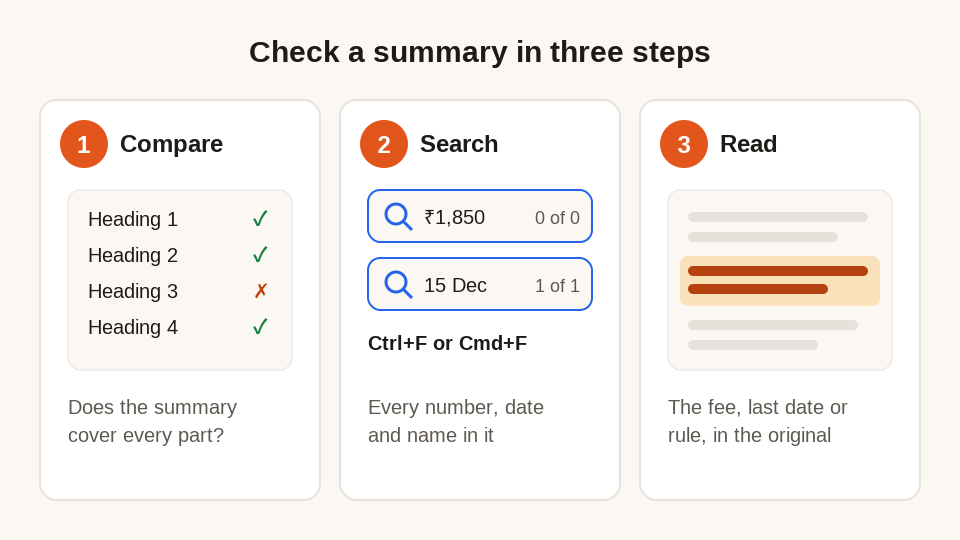
- Compare the shape. Scroll through the original and look at its headings, the first paragraph and the last. Does the summary cover each part, or does it skip a section entirely? If the article has six headings and the summary only talks about three, something is missing.
- Search every number and name. Use Find on the page (
Ctrl+Fon Windows,Cmd+Fon a Mac) and search for each number, date and name in the summary. If you can't find it, or it sits next to different words, the summary has it wrong. - Read the parts that matter in full. Whatever would change your decision, such as the fee, the last date, the eligibility rule or the penalty, read that paragraph yourself. The summary's job was to tell you where to look.
If a summary fails any of these checks, don't ask the AI to "fix" it and then trust the new version. Go to the original for that part.
When not to rely on a summary at all
Some documents are too important for a summary to be the last word. Use AI to find your way around them, then read the relevant parts yourself, or ask a person who knows the subject.
Be careful with breaking news too. The EBU and BBC study found errors on fast-moving stories, where details change by the hour. If an AI summary of a news story surprises you, look at the publisher's own article and its date.
Summaries in your own language
One of the best uses of AI is reading something in English and getting the gist in Telugu, Hindi, Tamil or another language you are more comfortable in. It is also where an extra layer of mistakes can creep in, because the tool is summarising and translating at the same time.
A few habits make this safer:
- Ask for important terms to stay in English in brackets, so "repo rate", "Tatkal quota" or "notice period" can still be searched in the original.
- Ask for numbers in digits, not words. "15 days" is easier to check than a translated phrase.
- If something sounds wrong, ask for the same summary in English and compare. If the two disagree, check the original.
Keep private documents private
Whatever you paste into an AI tool in the cloud is sent to that company's servers to make the answer. For a news article, that's usually fine. For a salary slip, a medical report, a client's contract or anything from work, it may not be. Some workplaces tell staff not to use public AI tools for official documents at all. In 2025, for example, India's Finance Ministry advised its employees against using such tools for office work, citing the confidentiality of government data. Check your office's rules first.
Where you can, use a tool that runs on your own computer for private material, or remove names, account numbers and other personal details before you paste.
Summaries in Hunt Browser
Hunt Browser has Hunt AI built into the side panel on Windows and Mac. Open Ask AI on any page and tap Summarize or Key facts: both are made on your computer, straight away, with no account. If you download the free on-device model once (on Wi-Fi), Hunt AI can also explain the page simply, translate it and answer your own questions about it, still on your computer, so the page doesn't leave your device.
Answers from Hunt AI in the cloud, which uses a larger model, need a Hunt account, and sign-in is coming soon. Like every AI tool, Hunt AI can make mistakes, so the three-step check above applies to its summaries too.
Questions
Are AI summaries accurate enough for studying?
They are a good way to get an overview and to make revision notes, but they should not replace the chapter for anything that will be tested. Ask for a section-by-section summary in the original order, then check definitions, formulas and exceptions against your textbook or class notes. If your teacher stressed a point and the summary skips it, trust your teacher.
Why does the AI summary sound more certain than the article?
AI tools tend to smooth out hedges like "may", "in this group" and "early results suggest", because short confident sentences are what most summaries look like. A 2025 study of science summaries found this overgeneralising in most of the models tested. Ask the tool to keep such words, and compare any strong claim with the original.
Is it safe to paste a PDF or document into an AI tool?
It depends on the document and the tool. Cloud tools send what you paste to their servers, so avoid pasting ID proofs, bank statements, medical records, other people's personal details or confidential work files. An AI that runs on your own computer keeps the text on your device, which is better for private material.
How long should a good summary be?
Long enough for your purpose. Three lines are fine for deciding whether to read something. Revision notes may need one or two lines per section. If you need to act on a document, ask for every rule, date and amount, however long that makes the list, and then read those parts yourself.
Sources
- News Integrity in AI Assistants, EBU and BBC (October 2025)
- EBU press release: AI assistants misrepresent news content 45% of the time
- Peters and Chin-Yee, Generalization bias in large language model summarization of scientific research, Royal Society Open Science (2025)
- Liu et al., Lost in the Middle: How Language Models Use Long Contexts (2023)
- India's finance ministry asks employees to avoid AI tools, Reuters via The Kathmandu Post (February 2025)
- Hunt AI on your device, Hunt Browser features
Hunt Browser blocks ads and trackers before they load, and has Hunt AI built in. Free for Windows and Mac.
Keep reading
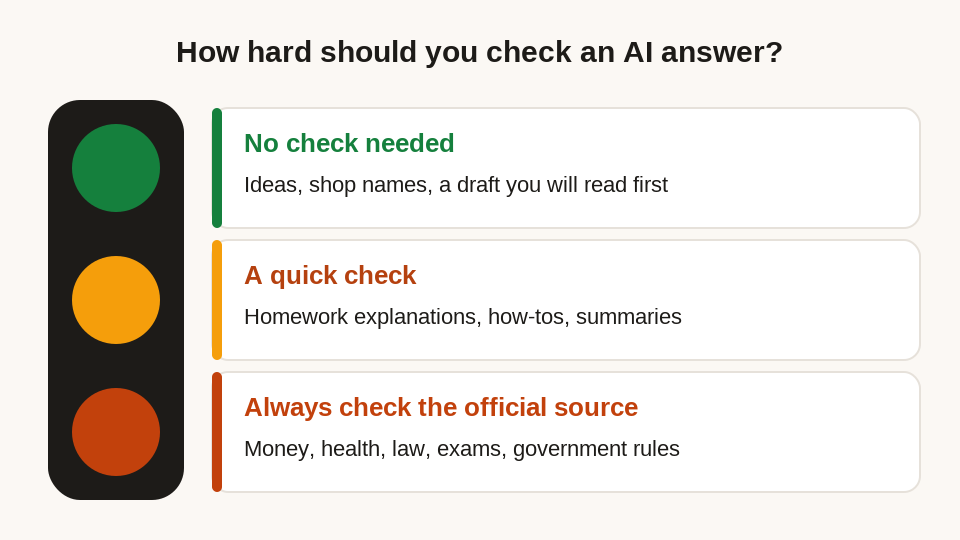
When AI gets it wrong: how to check an AI answer in two minutes
AI answers sound sure even when they're wrong or out of date. Which answers need checking, a two-minute method, and the red flags that should make you stop.
12 November 2026 · 9 min read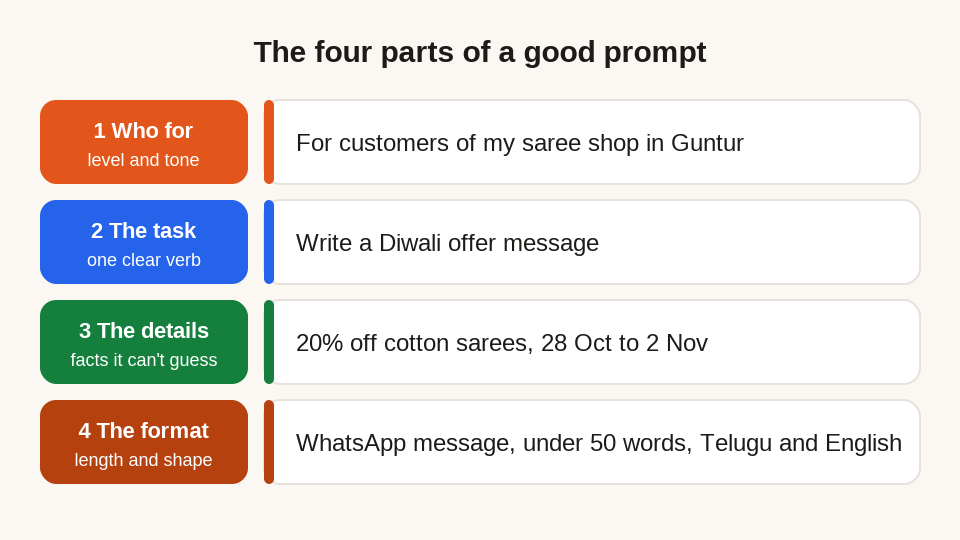
20 everyday AI prompts for students, shopkeepers and office workers
Twenty ready-to-use AI prompts for studying, running a shop and office work, plus the four parts of a good prompt and what never to paste into an AI tool.
11 November 2026 · 9 min read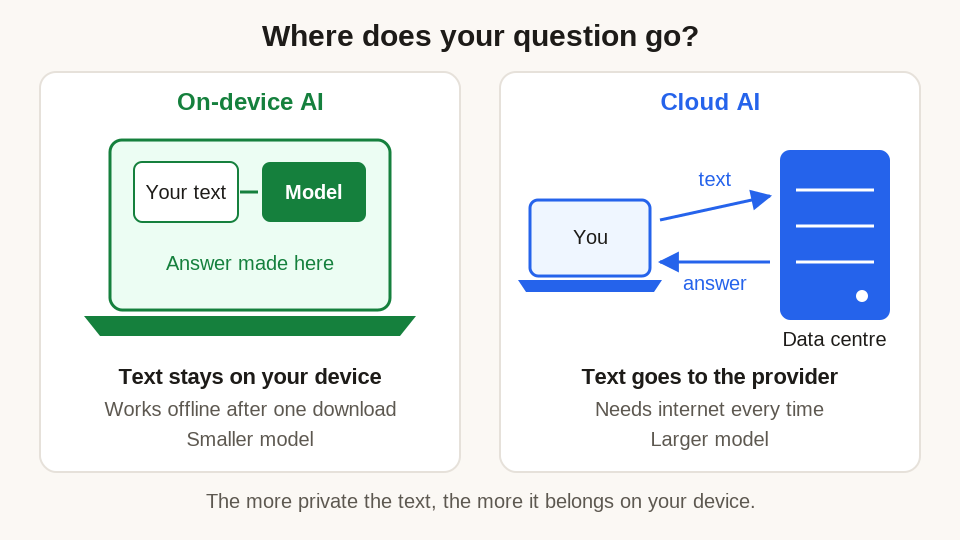
On-device AI and cloud AI: what's the difference, and why it matters
Where an AI tool runs decides who sees your text, whether it works offline, how fast it is and how good the answers are. A plain guide to choosing.
8 November 2026 · 8 min read