

 Blog
BlogHow to tell a fake app or browser extension from the real one
Fake apps and extensions copy real names and logos to steal OTPs and data. Six checks before you install, and what to do if you already have.
Lakshmi got a WhatsApp message from an unknown number: a traffic challan was pending on her scooter, and she should "download the e-challan app" to pay it. The attachment was a file ending in .apk. Her neighbour Farhan, around the same time, searched for a free PDF converter for his browser and installed the first result, which had a familiar-looking icon and a slightly different name.
Both were fakes. The first was built to read Lakshmi's SMS messages and forward her bank OTPs. The second asked for permission to read every page Farhan opened.
Fake apps and extensions work because they look like the real thing. The good news is that a few checks, which take less than a minute, catch nearly all of them. This guide covers phone apps, the APK files that arrive on WhatsApp, and browser extensions.
Why fake apps work
India's cyber security agency, CERT-In, describes fake apps as ones that imitate real apps to trick people into installing them. Some copy an existing bank, government or shopping app. Others pretend to be the "official app" for a service that doesn't have one, such as a scheme, an exam result or a festival offer.
They spread in two ways. Some are posted to app stores with a lookalike name and logo, hoping to slip past review. CERT-In has noted that harmful apps do sometimes get past the stores' checks, so being in a store isn't a guarantee. Others never go near a store and arrive as a file or link in a message, which is where most of the damage in India happens.
The golden rule: start from the real source
The safest habit is to never install an app or extension from a link someone sends you. Instead:
- Go to the organisation's own website by typing its address, and follow its link to the app. Banks, government services and large companies list their official apps on their own sites.
- Or search inside your phone's official app store (Play Store on Android, App Store on iPhone) and check the listing carefully, as described below.
- Treat any app sent over SMS, WhatsApp or Telegram as fake until proven otherwise, even if it comes from a friend's number. Their phone may already be infected.
Police in several states have warned about fake "wedding invitations", "PM Kisan" and "e-challan" files sent as APKs. As one cybercrime team put it, genuine wedding cards are shared as photos or PDFs, never as app files.
Six checks on an app store listing
Before you tap Install, scroll down the listing. It takes a minute.
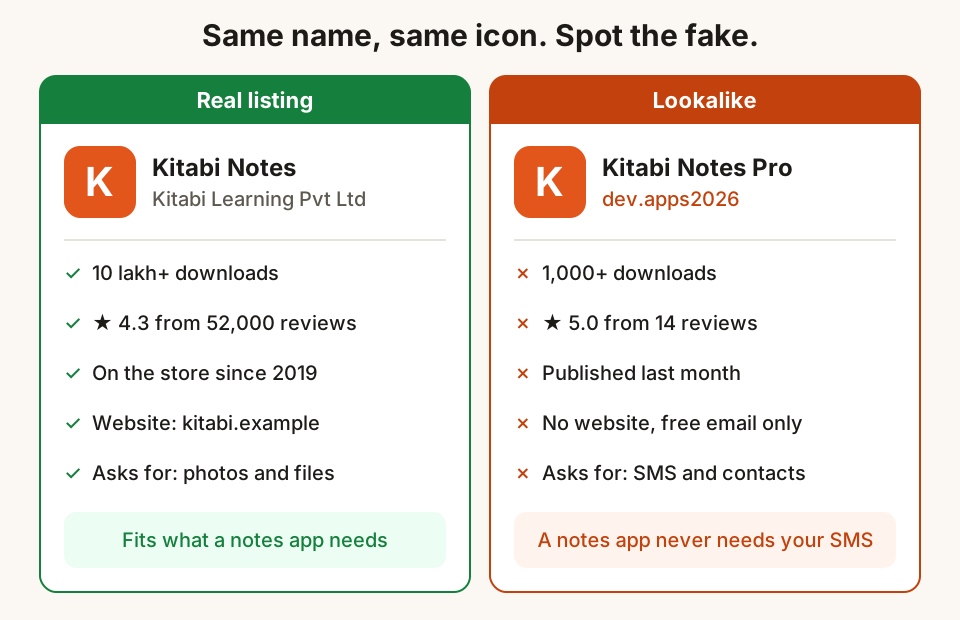
- Developer name. Tap it. A real bank's app is published by the bank, not by "dev.apps2026" or a person's name. The developer page should list a website and email that match the organisation.
- Downloads and age. A popular service's real app usually has lakhs or crores of downloads and years of history. A lookalike often has a few thousand and was published last month.
- Reviews. Read the recent one-star reviews, not just the average. A short list of perfect five-star reviews with similar wording is a warning sign, which CERT-In also calls out.
- Spelling and icon. Look for small differences: an extra word like "Pro" or "Update", a missing letter, a stretched or blurry logo.
- Permissions that don't fit. CERT-In's test is simple: what an app asks for should match what it does. A torch, wallpaper or PDF app has no reason to read your SMS, contacts or call logs.
- The Data safety section. On Android this shows what data the developer says the app collects and shares. It is declared by the developer and not checked line by line, so treat it as their promise, not proof. A listing that says it collects your messages or financial information for a simple tool deserves a second look.
APK files: why they are risky
An APK is an Android app packaged as a single file. Apps from the Play Store are APKs too, but they go through the store's checks and updates. An APK that arrives in a chat goes through none of that.
To install one, your phone asks you to allow Install unknown apps for the app that opened it, such as WhatsApp or your file manager. That warning is there for a reason. Once installed, a harmful APK can ask for permission to read SMS, which lets it forward every OTP your bank sends. Some ask you to turn on Accessibility for them, which lets an app see and tap things on your screen. The government's Cyber Swachhta Kendra advises never giving Accessibility access to an unknown or unverified app.
Two settings help:
- Keep "Install unknown apps" off for WhatsApp, Telegram, your browser and your file manager. On most Android phones you can find it by searching "Install unknown apps" in Settings.
- Keep Play Protect on. Open the Play Store, tap your profile picture, then Play Protect, then the settings icon, and check that Scan apps with Play Protect is on. It checks apps on your phone, including ones from outside the store, and warns about harmful ones.
Browser extensions: the same trick, more access
Extensions are small add-ons for your browser: ad blockers, PDF tools, grammar checkers, download helpers, coupon finders. Most are useful. But an extension can have more access than a phone app, because it can sit inside every web page you open.
When you install one, your browser shows what it is allowed to do. The broadest permission lets the extension read and change your data on all websites you visit, which includes your email, your bank's site and every form you fill in. Some tools genuinely need this, such as an ad blocker. Many don't.
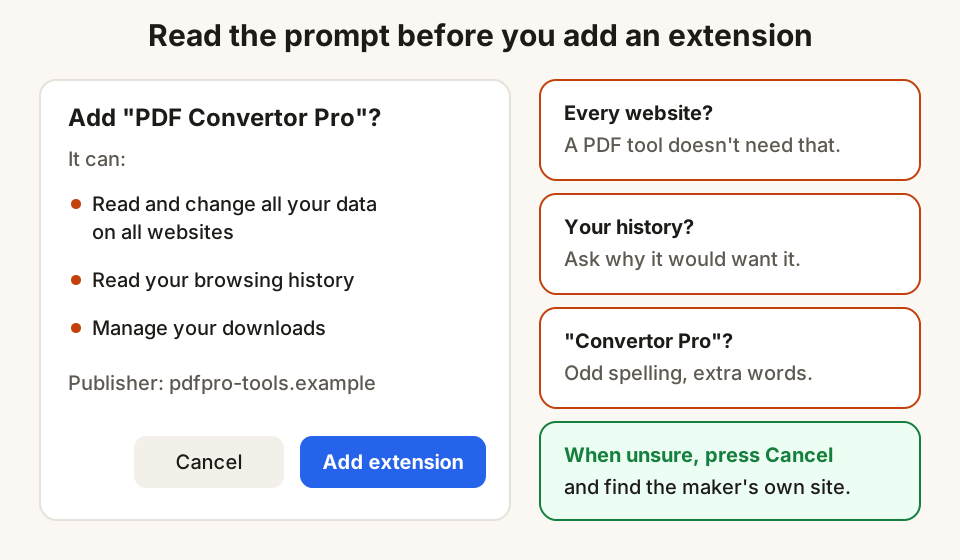
Fake extensions copy popular names, just like fake apps. There is also a quieter risk: an honest extension can be sold to a new owner, who then pushes an update that injects ads or collects browsing data. In 2026, for example, a reporter found that an image-saving extension with over a million users had changed hands and started hijacking shopping links. Updates install by themselves, so you may not notice the change.
Checks for extensions:
- Start from the maker's website. A real company links to its extension from its own site. If you can't find the link there, be careful.
- Check the publisher, users and reviews on the store listing, the same way as for apps.
- Read the permission prompt. A coupon finder or a single-site helper that wants access to all websites deserves a pause.
- Fewer is better. Every extension is one more party that could change hands. Keep only the ones you use every week.
- Watch for sudden changes. New pop-ups, ads on sites that never had them, or your search going to an unknown engine often mean an extension has changed. Remove it.
A five-minute monthly clean-up
Once a month, while you wait for the chai:
- On your phone, scroll through your apps and uninstall anything you haven't opened in a month.
- Open Settings and search Permission manager (Android) or check Privacy (iPhone). Look at who can read SMS, contacts and location, and switch off anything that doesn't need it.
- In your browser, open the extensions page from the menu. Remove anything you don't recognise or no longer use.
- Make sure your phone and browser are up to date. Updates fix security holes that harmful apps try to use.
How Hunt Browser handles this
The same rules apply to us, so here is how to check Hunt Browser. It is only offered from huntbrowser.com/download. The Windows installer is signed by Newtact Lab Private Limited, and the download page lists each file's SHA-256 checksum with the command to check it, so you can confirm the file you have is the one we published. Hunt's extensions for other browsers are listed at huntbrowser.com/extensions, so install them from the links there rather than from a search result.
Hunt Browser on Windows and Mac also has some tools built in that people often install extensions for, such as PDF tools that merge, split and compress files on your computer, so you need fewer add-ons from publishers you don't know.
Questions
If an app is in the official store, is it safe?
It is much safer than an APK from a chat, but not guaranteed. CERT-In has noted that harmful apps sometimes get past store reviews. Check the developer, downloads, reviews and permissions before installing, especially for anything to do with money or government services.
A friend sent me an APK. Can I install it?
Don't. Your friend's phone may be infected and sending the file to all their contacts without their knowledge. Ask them what the app is, then find it yourself in the official store or on the organisation's website.
How do I know a browser extension is from the real company?
Go to the company's own website and use its link to the extension. On the store listing, check that the publisher name and website match the company, and that it has a long history and many users. Be wary of lookalike names with extra words like "Pro" or "Plus".
I gave an app permission to read my SMS. What should I do?
If you don't trust the app, uninstall it. If it is an app you trust that doesn't need SMS access, switch that permission off in Settings. If you've seen OTPs you didn't ask for, or any money has moved, call your bank and 1930 straight away.
Are "modded" or "premium unlocked" apps safe?
No. A modified copy of a paid app is changed by someone you don't know, from code you can't see, and distributed outside the store's checks. It is one of the easiest ways to hide harmful code.
Sources
- CERT-In advisory on fake apps, CIAD-2018-0033 (CERT-In)
- Mobile based malware: methods and countermeasures, CIAD-2022-0014 (CERT-In)
- SpyMax Android malware alert (Cyber Swachhta Kendra)
- Invited to a wedding? Police say check the link before you click (The Tribune)
- Nagaland Police alert on malicious PM Kisan Yojana APK (News on AIR)
- Use Play Protect to help keep apps safe (Play help)
- About the Data safety section (Play help)
- Install unknown apps (Android Developers)
- Permissions requested by extensions (extension store help)
- A popular extension that turned into spyware after a sale (PCWorld, March 2026)
- National Cybercrime Reporting Portal and helpline 1930 (I4C, Ministry of Home Affairs)
Hunt Browser blocks ads and trackers before they load, and has Hunt AI built in. Free for Windows and Mac.
Keep reading
Two-step verification: switch it on for the accounts that matter
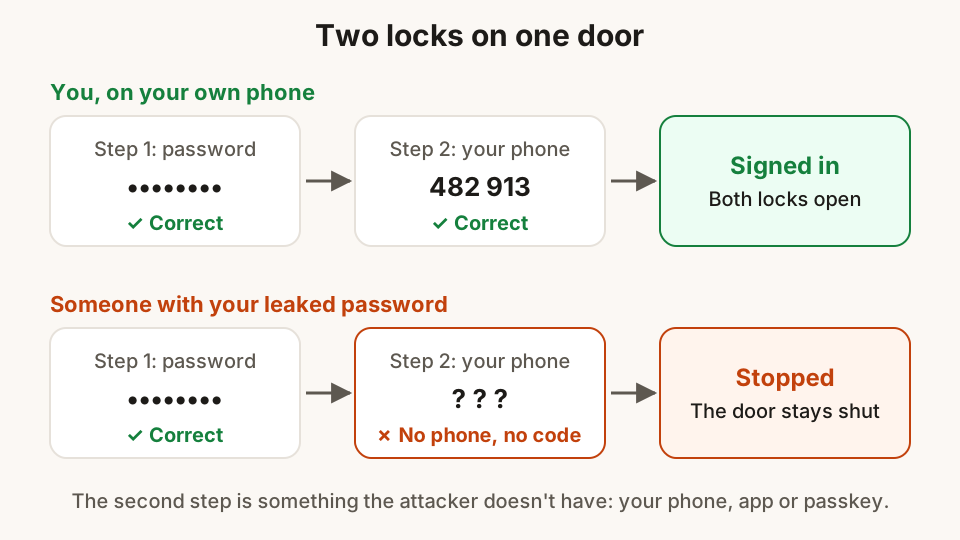
A password alone is easy to steal. How two-step verification works, which kind to pick, and the order to switch it on for email, WhatsApp and social media.
30 October 2026 · 9 min read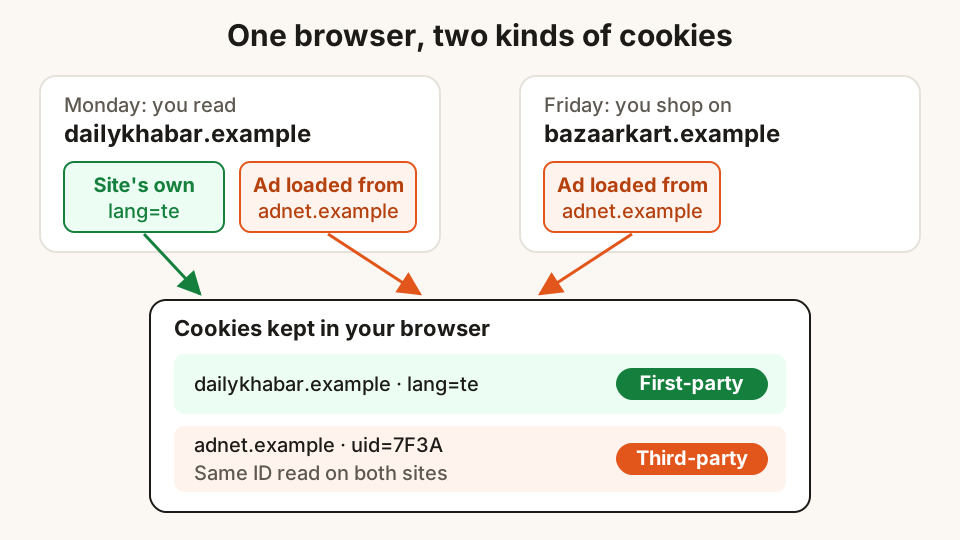
What website cookies are, and what "Accept all" really means
Cookies keep you signed in and remember your language, but some follow you from site to site. What the banner buttons do, and how to choose well.
29 October 2026 · 10 min read
Using public Wi-Fi at stations, cafés and airports safely
What free Wi-Fi can and can't see, how to spot a fake hotspot or login page, which settings to change, and what to keep on mobile data instead.
28 October 2026 · 8 min read