

 Blog
Dark mode and eye strain: what helps and what doesn't
Does dark mode protect your eyes? What studies say about reading, eye strain, blue light, sleep and battery, and the habits that make a real difference.
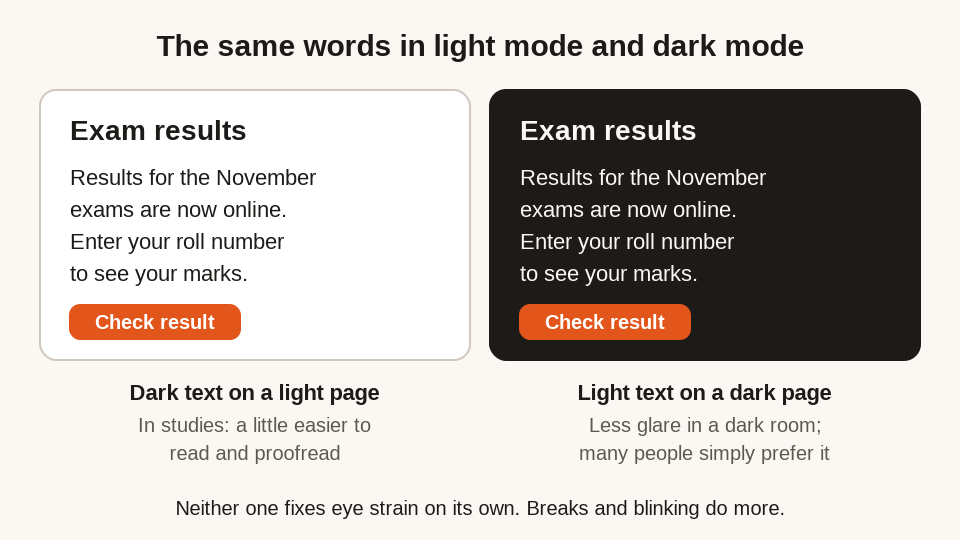
It's 11 at night and Priya is revising for her semester exams on her laptop. The white page glares in the dark room, so she switches everything to dark mode. Her eyes feel better straight away. But a friend tells her dark mode is bad for reading, and her uncle says the real danger is "blue light". Who's right?
The honest answer is that dark mode is mostly about comfort and taste, not eye health. It can make a screen easier to look at in a dim room. It does not, on its own, stop tired eyes, and it isn't needed to protect them from damage.
This article goes through what research has actually found, where the evidence is thin, and the simple habits that do more for your eyes than any colour setting. It's general information, not medical advice. If your eyes hurt often, see an eye doctor.
What dark mode actually is
Most pages show dark text on a light background. Researchers call this positive polarity, because it looks like ink on paper. Dark mode flips it to light text on a dark background, which is negative polarity.
Phones, computers and most apps now offer a dark setting, and many websites switch to a dark design when your device asks for one. Sites without a dark design stay bright unless your browser darkens them for you.
What studies say about reading
Lab studies have compared the two styles for decades, and the pattern is fairly consistent: in a normally lit room, most people read and proofread a little more accurately with dark text on a light background.
A 2013 study in the journal Ergonomics tested younger and older adults on eyesight tests and proofreading. Both age groups did better with dark text on light. The researchers had wondered whether older eyes might prefer dark mode, and found they didn't. A follow-up by the same team in 2014 measured pupils while people proofread. With dark text on a light page, pupils were smaller and proofreading was more accurate. Their explanation: a brighter screen makes the pupil smaller, and a smaller pupil gives a sharper image, a bit like a camera with a smaller aperture.
Not every study agrees. A 2024 study of charts and graphs found that which style worked better varied from person to person.
The differences in these studies are small. They matter for long, careful reading, like checking a spreadsheet of invoices or proofreading an assignment. For a quick look at WhatsApp Web or the news, you're unlikely to notice them.
Eye strain comes from how we use screens
Tired, dry, achy eyes after hours at a screen are common. Eye doctors call it digital eye strain. The American Academy of Ophthalmology, a body of eye specialists, explains that the main cause isn't the screen's colours but how we use it. We stare, focus at one distance for a long time and forget to blink.
People normally blink about 15 times a minute. When looking at a screen, that drops to about 5 to 7. Fewer blinks mean the surface of the eye dries out, and that is a big part of the gritty, tired feeling.
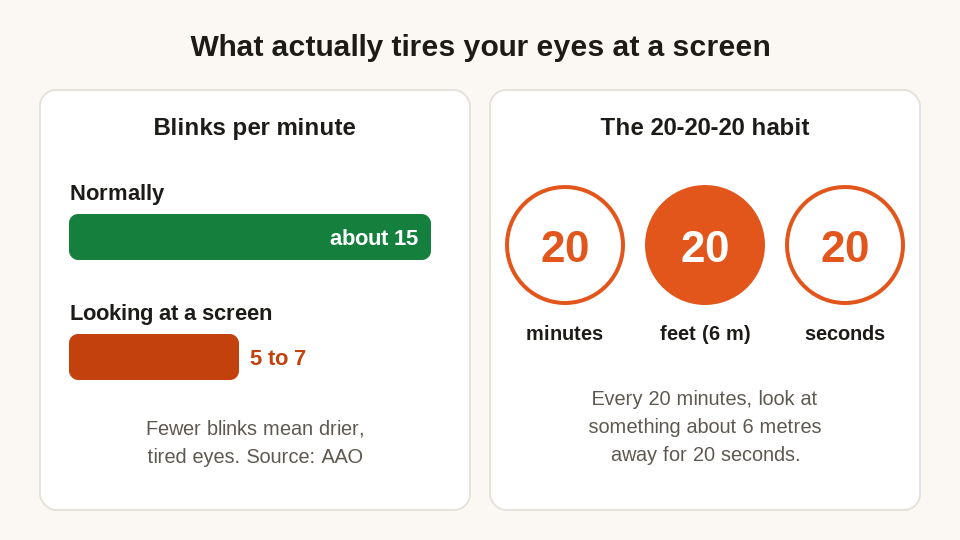
Dark mode doesn't change how often you blink or how long you stare. That's why switching to it can make a screen feel gentler in a dark room while still leaving your eyes tired after a three-hour session.
What the Academy does recommend:
- The 20-20-20 habit: every 20 minutes, look at something about 20 feet (6 metres) away for 20 seconds. Out of a window works well.
- Blink on purpose, especially when you notice your eyes feel dry. Artificial tears can help dry eyes.
- Sit about an arm's length from the screen (around 25 inches, or 60 cm), with the screen slightly below eye level.
- Match the screen to the room. A screen much brighter than its surroundings makes your eyes work harder.
- Cut glare from windows and lights, for example with a matte screen filter.
Where dark mode does help
That last point about matching the room is where dark mode earns its place. In a dark bedroom, a bright white page is the brightest thing in sight. Dark mode, or simply turning the brightness down, brings the screen closer to the room and makes it more comfortable to look at.
Many people also just prefer it, and comfort counts. If you read better and longer without squinting, that's a good reason to use it. Some people with eye conditions find bright screens uncomfortable; if that's you, ask your eye doctor what settings suit you.
Dark mode is less pleasant in bright daylight or a well-lit office, where light text on black can look faint and reflections show up more. Many devices can switch between light and dark automatically by time of day, which gives you the best of both.
Blue light: less scary than it sounds
You've probably seen ads for blue-light glasses and screen filters that promise to protect your eyes. Here is what the evidence says.
- Screens aren't damaging your eyes. The American Academy of Ophthalmology says there is no scientific evidence that blue light from digital devices damages the eye. The sun gives off far more blue light than any screen.
- Blue-light glasses probably don't help eye strain. A 2023 Cochrane review, which pooled 17 trials, found these lenses may make no difference to eye strain from computer use in the short term. It couldn't draw conclusions about sleep or long-term eye health.
- Light at night can affect sleep. Blue light does play a part in the body's day-and-night rhythm. The Academy suggests cutting down on screens for two to three hours before bed, and says night-time settings can reduce evening blue light.
Dark mode and night settings are different things. Dark mode changes the page's colours. A night setting (called Night light on Windows and Night Shift on a Mac) makes the whole screen warmer and more orange in the evening. You can use either, both or neither.
What about short-sightedness?
Short-sightedness, or myopia, is rising among children in many countries, and parents sometimes ask whether dark mode could help. One interesting study is worth knowing about, with a big caution attached.
In 2018, researchers in Germany measured the choroid, a layer at the back of the eye, in young adults. After an hour of reading black text on white, it got slightly thinner. After an hour of white text on black, it got slightly thicker. A thinner choroid has been linked with myopia developing, so the authors suggested that reading in dark mode might slow myopia.
That's a hypothesis, not a finding. The study was short and in adults, and it didn't measure anyone's eyesight changing. A later study of 36 young adults found no significant change in the choroid from either style. No one has shown that dark mode prevents short-sightedness in children. What eye specialists do recommend for children is plenty of time outdoors in daylight.
Dark mode saves battery, sometimes
There's one clear benefit that has nothing to do with eyes. On phones with an OLED screen, where each pixel makes its own light, dark pixels use less power.
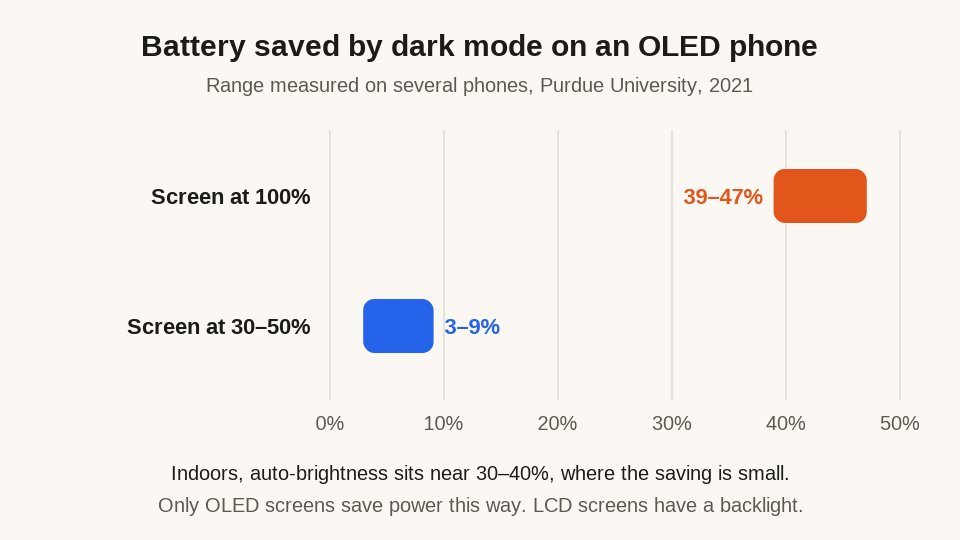
Engineers at Purdue University measured this in 2021 on four phones. At full brightness, dark mode cut the screen's battery use by 39% to 47%. At 30% to 50% brightness, close to where automatic brightness sits indoors, the saving was only 3% to 9%, too small to notice. Older LCD screens have a backlight that stays on whatever the colours, so they don't save power this way.
How to turn dark mode on
| Device | Where to find it |
|---|---|
| Windows 11 | Settings → Personalization → Colors → Choose your mode → Dark |
| Mac | System Settings → Appearance → Dark, or Auto to switch by time of day |
| Android | Usually Settings → Display → Dark theme (names vary by phone) |
| iPhone | Settings → Display & Brightness → Dark |
For the warmer evening screen, look for Night light on Windows (Settings → System → Display) and Night Shift on a Mac (System Settings → Displays → Night Shift).
Your browser usually follows the device setting, and websites that have their own dark design will use it. In Hunt Browser for Windows and Mac, Dark mode for every site in Hunt Tools also darkens bright sites that don't have a dark design, and you can keep any site as it is. Sites that already have a dark theme are left alone.
Questions
Is dark mode better for your eyes?
Not in any proven way. It can feel more comfortable in a dim room, and that's a fine reason to use it. But studies show most people read slightly better with dark text on a light page in normal light, and eye strain comes mostly from long stretches of staring and blinking less, which dark mode doesn't change.
Does dark mode reduce blue light?
A dark page gives off less light overall, so less blue light too. But eye specialists say the blue light from screens isn't harming your eyes in the first place. If you're thinking of sleep, cutting screen time before bed and using a night setting are the steps the American Academy of Ophthalmology mentions.
Should children use dark mode to prevent short-sightedness?
There's no evidence that it does. One small study in adults found a short-term change at the back of the eye that hints at a possible link, but that's far from proof. Time outdoors in daylight is what eye specialists recommend for children.
Why do my eyes still feel tired in dark mode?
Because the main causes of eye strain, staring for long periods, blinking less and focusing close up, are the same in light or dark mode. Try the 20-20-20 habit, blink on purpose, and set the screen's brightness to match the room. If discomfort keeps coming back, get your eyes checked; you may need glasses for screen distance.
Sources
- Computers, digital devices and eye strain (American Academy of Ophthalmology)
- Should you be worried about blue light? (American Academy of Ophthalmology)
- Blue-light filtering spectacle lenses and digital eye strain, Cochrane review, 2023
- Piepenbrock and others, "Positive display polarity is advantageous for both younger and older adults", Ergonomics, 2013 (catalogue record)
- Piepenbrock, Mayr and Buchner, "Smaller pupil size and better proofreading performance with positive than with negative polarity displays", Ergonomics, 2014 (catalogue record)
- While and Sarvghad, "Dark mode or light mode? Exploring the impact of contrast polarity on visualization performance between age groups", 2024
- Aleman, Wang and Schaeffel, "Reading and myopia: contrast polarity matters", Scientific Reports, 2018
- The influence of contrast polarity during reading (later study in young adults)
- Prevent childhood myopia with sunshine and time outdoors (American Academy of Ophthalmology)
- Dark mode may not save your phone's battery life as much as you think (Purdue University, 2021)
- Personalize your colors in Windows (Windows help)
- Set your display for night time in Windows (Windows help)
- Use a light or dark appearance on your Mac (Mac User Guide)
- Use Night Shift on your Mac (Mac help)
Hunt Browser blocks ads and trackers before they load, and has Hunt AI built in. Free for Windows and Mac.
Keep reading
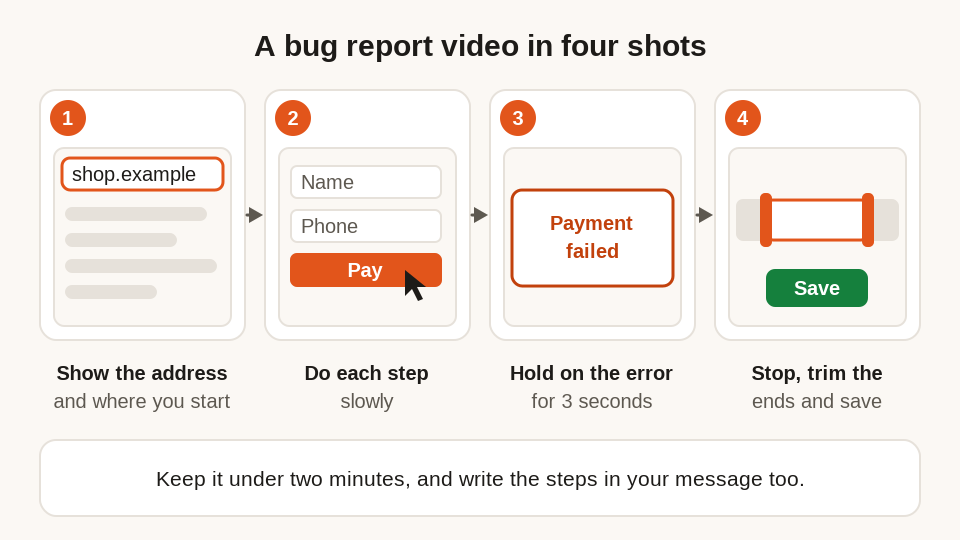
How to record your screen for a tutorial or a bug report
Record your screen on Windows, Mac, Android or iPhone with built-in tools, hide private details first, and make a clear tutorial or bug report video.
18 November 2026 · 8 min read
30 browser keyboard shortcuts that save time every day
Thirty keyboard shortcuts for tabs, the address bar, finding text and zoom, with Windows and Mac keys side by side and an easy way to learn them.
15 November 2026 · 8 min read
Merge, split and compress PDFs without uploading them anywhere
Free PDF websites upload your Aadhaar, PAN and bank statements to their servers. How to merge, split, compress and sign PDFs on your own computer instead.
14 November 2026 · 9 min read