 Blog
BlogHow to spot a phishing link before you tap it
Read a web address the right way, catch lookalike sites and fake KYC or bill messages, and know what to do and where to report if you've already tapped.
Ravi got an SMS at 8 in the evening: his bank account would be blocked tonight unless he updated his KYC, with a link to do it. The page that opened had the bank's colours, a login box and a countdown timer. It looked right. The address in the bar was the only thing that wasn't.
That's how most phishing works. A message rushes you to a page that copies a real one, and the page asks for your login, card number, OTP or UPI PIN. Nothing gets "hacked"; you're simply persuaded to type your details into the wrong site.
The good news is that the wrong site almost always gives itself away in its address, and reading an address takes five seconds once you know where to look. This guide shows you how, with the other warning signs and what to do if you've already tapped.
Read the address from the right place
A web address has a structure, and only one part of it tells you whose site it is. Scammers rely on the fact that people read addresses from the left, where they can put anything they like.
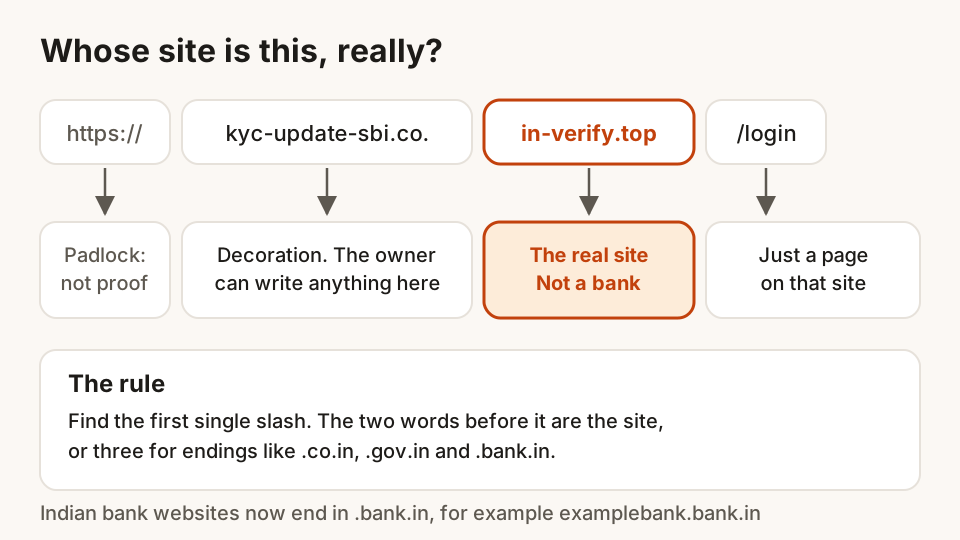
Here's the rule:
- Find the first single slash
/after thehttps://. If there's no slash, use the end of the address. - Look at the words just before it. The last two words, joined by a dot, are the site's real name. For Indian endings like
.co.in,.gov.inor.bank.in, take the last three. - Everything to the left of that is decoration that the site owner chose. Everything to the right is just a page on that site.
So in https://kyc-update-sbi.co.in-verify.top/login, the site is in-verify.top. The bank's name, the co.in and the word "kyc" are all decoration on someone else's site.
Seven signs a link is a trap
1. The real name isn't the company's name
Once you've found the real site name, ask whether it's exactly the company you expect. examplebank.bank.in and examplebank-bank.in are different owners, even though they differ by one dot and one dash.
2. Lookalike letters
Watch for swaps that are hard to see on a phone: rn for m, 0 for o, 1 or I for l, an extra letter, or a missing one. When in doubt, zoom in or copy the address into a notes app where you can read it slowly.
3. The ending is wrong for an Indian bank or government office
This is one of the most useful checks in India. In April 2025 the Reserve Bank of India told banks to move their websites to addresses ending in .bank.in, and to finish by 31 October 2025. A message claiming to be your bank but pointing to .top, .xyz, .info or any other ending is a strong warning.
Government sites mostly end in .gov.in or .nic.in. The .gov.in registry only gives these names to government bodies, so a "ministry" or "income tax refund" page on a .com or .online address isn't one. A few official services use other endings, so treat the right ending as a good sign, not as proof.
4. A shortened link hides where it goes
Links like bit.ly/xyz or other short codes hide the real address until you tap. Treat a short link in a message about your account or a payment with extra suspicion. Long-press the link to preview it without opening, or don't tap at all.
5. The padlock doesn't mean "safe"
The padlock and https mean the connection between you and the site is encrypted, so others on the network can't read it. They say nothing about who runs the site. Phishing sites get padlocks for free, just like real ones.
6. The message rushes or rewards you
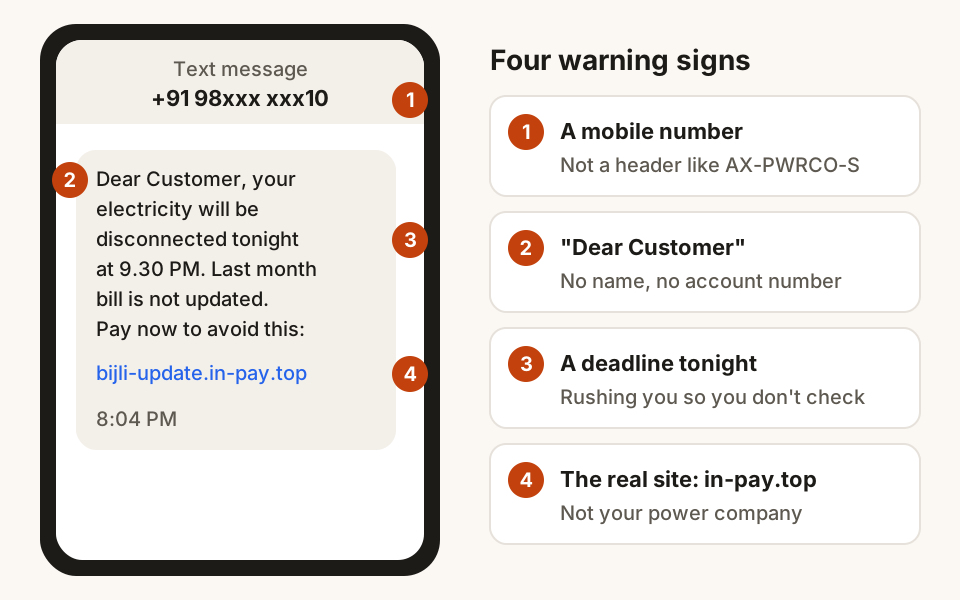
"Blocked today", "electricity cut at 9.30 tonight", "parcel on hold", "refund of ₹4,850 pending", "you've won". Real organisations send reminders, but they don't need you to act within the hour through a link. Urgency is there to stop you from thinking.
7. The sender doesn't add up
Businesses in India send bulk SMS from registered headers, such as AX-ABCBNK-S, not from ordinary 10-digit mobile numbers. Under TRAI's rules, the letter after the last dash shows the type: P for promotional, S for service, T for transactional and G for government. A "bank" or "electricity board" message from a personal mobile number is a red flag. A proper header isn't proof on its own, but a missing one is a reason to stop.
On WhatsApp and email, the display name can say anything. Look at the actual number or email address, and remember that a known contact's account can be taken over too.
The messages you're most likely to see
The wording changes every few weeks, but the same few stories come back again and again. Knowing them makes the next one easier to spot.
| The message says | What it really wants | What to do instead |
|---|---|---|
| Your KYC or PAN must be updated today | Your bank login and OTP | Open your bank's app; KYC updates are done there or at the branch |
| Your electricity will be cut tonight | A "bill payment" to the scammer | Check the bill in your power company's official app or website |
| Your parcel is held, pay a small fee | Your card details | Track the parcel on the courier's site using the number from the shop |
| You have a refund or reward waiting | Your UPI PIN, to "receive" it | Remember that receiving money never needs a PIN |
| Your SIM or number will be blocked | Personal details or a remote-access app | Call your mobile operator's official helpline |
| Hi, it's me, new number, need urgent help | Money sent to a stranger | Call the person on their old number first |
How to check a link without tapping it
The safest habit is simple: don't use links in messages to sign in or pay. Open the bank's app, or type the address you already know into your browser yourself, and look for the same notice there. If your account really needs attention, it will say so inside.
When you do need to check a link:
- Long-press it and choose to copy, then paste it somewhere you can read the whole thing.
- Find the real site name using the rule above.
- If you're not sure, call the number printed on your card, passbook or bill, not a number from the message or from a search result.
- Ask someone. A family member reading it fresh often spots what you missed in a hurry.
If you've already tapped the link
Tapping alone is rarely the problem. What matters is what you typed or allowed next.
- If you only opened the page, close it. Don't enter anything, and don't download or install anything it offers.
- If you typed a password, change it straight away on the real site or app, and on any other site where you used the same password.
- If you entered card, bank or UPI details, or an OTP, call your bank's official number to block the card or UPI, then report it as below.
- If money has left your account, call the national cybercrime helpline 1930 at once and file a complaint at cybercrime.gov.in. Reporting quickly gives the best chance of the money being held before it moves on.
- If an app was installed, uninstall it, and if it had permission to read SMS or control the screen, ask your bank to block and reissue your card and UPI.
Report the message, even if you didn't fall for it
Reporting helps get the numbers and links behind these messages shut down. The Department of Telecommunications runs Chakshu on the Sanchar Saathi portal, where you can report a suspected fraud call, SMS or WhatsApp message. Report within 30 days of receiving it. Chakshu is for suspicious messages; if you've already lost money, use 1930 or cybercrime.gov.in instead.
You can also forward the message to your bank's fraud reporting address or number, listed on its official website.
Questions
Is a site with a padlock safe to use?
Not necessarily. The padlock means the connection is encrypted, not that the site is honest. Phishing pages use padlocks too. Check the real site name in the address instead.
Can I get hacked just by tapping a link?
It's uncommon on an up-to-date phone or computer. The real danger is what comes after: typing your details, approving a payment, or installing an app the page offers. Keep your phone and browser updated, and close any page that asks for more than it should.
How do I know if an SMS is really from my bank?
Check that it comes from a registered header rather than a mobile number, and that any link ends in .bank.in. Better still, ignore the link and open your bank's app or call the number on your card. If the message is real, the same information will be there.
Where do I report a phishing message in India?
Report suspected fraud calls, SMS and WhatsApp messages through Chakshu on the Sanchar Saathi portal. If you've lost money, call 1930 and file a complaint at cybercrime.gov.in, and tell your bank straight away.
Sources
- Migration to '.bank.in' domain, Reserve Bank of India circular, 22 April 2025
- gov.in domain registration guidelines, GOV.IN Registry
- Telecom Commercial Communications Customer Preference (Amendment) Regulations, 2025, TRAI
- TRAI Press Release No. 11/2025
- Chakshu: report suspected fraud communication, Sanchar Saathi
- National Cybercrime Reporting Portal, Indian Cybercrime Coordination Centre
Hunt Browser blocks ads and trackers before they load, and has Hunt AI built in. Free for Windows and Mac.